Planview PortfoliosPlanview
|
||||||
About
OneDesk combines Helpdesk & Project Management into one software application. No need to purchase, integrate and switch between other multiple applications. Your team can support your customers and work on their projects in one place. Aimed at SMBs as well as departments within large enterprises, OneDesk is frequently used by project managers, customer service agents, IT technicians, professional services and much more. This easy-to-use, feature-rich, and highly configurable software can manage both ticket & task workflows customizable to meet your organization's needs.
The interface is clean and structural. Navigation consists of selecting an application, project level and view layout. Breadcrumbs will indicate where you are in OneDesk. Tickets and tasks are 'Items' while organization, portfolio, project and sub-folders are 'Containers'. OneDesk is easy to use and quick to set up. The learning curve depends on the complexity of the workflows you create.
|
About
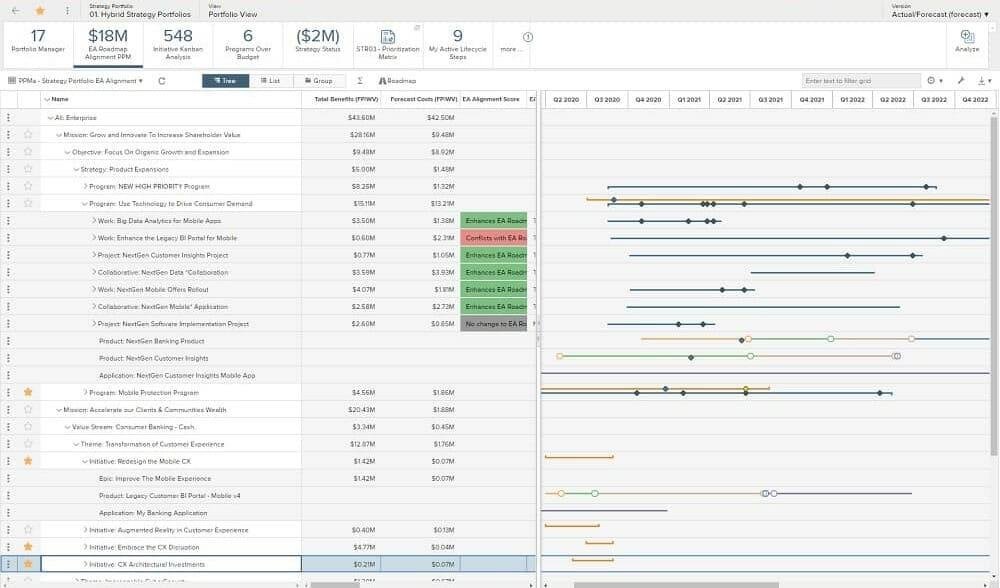
Planview® Portfolios enables enterprises to accelerate strategic execution by seamlessly integrating business and technology planning, optimizing resources, and leveraging the power of embedded AI — Planview Anvi™ — to deliver breakthrough products, services, and customer experiences. This unified approach aligns strategy with execution, driving enhanced business performance across the organization.
By empowering teams to strategically allocate resources and accelerate high-priority initiatives, Portfolios helps organizations adapt to change and respond to shifting market demands with greater agility. It increases speed-to-value, improves responsiveness, and ensures that every strategic investment delivers measurable business impact.
To support end-to-end work orchestration, Planview Portfolios provides robust, comprehensive capabilities across five key pillars that work together to drive organizational success — Strategy, Planning, Execution, Analytics & Reporting, and AI.
|
|||||
Platforms Supported
Windows
Mac
Linux
Cloud
On-Premises
iPhone
iPad
Android
Chromebook
|
Platforms Supported
Windows
Mac
Linux
Cloud
On-Premises
iPhone
iPad
Android
Chromebook
|
|||||
Audience
IT companies, IT department, Engineering, Financial, Nonprofit, Creative & Design Services, Public Relations Agencies, Marketing, VARS & Systems Integrators,Software, Consulting, Product Design & Manufacturing, Managed Service Providers,
|
Audience
Organizations that want to accelerate strategic execution
|
|||||
Support
Phone Support
24/7 Live Support
Online
|
Support
Phone Support
24/7 Live Support
Online
|
|||||
API
Offers API
|
API
Offers API
|
|||||
Screenshots and Videos |
Screenshots and Videos |
|||||
Pricing
$9/user/month
Free Version
Free Trial
|
Pricing
No information available.
Free Version
Free Trial
|
|||||
Reviews/
|
Reviews/
|
|||||
Training
Documentation
Webinars
Live Online
In Person
|
Training
Documentation
Webinars
Live Online
In Person
|
|||||
Company InformationOneDesk
Founded: 2008
Canada
www.onedesk.com
|
Company InformationPlanview
Founded: 1989
United States
www.planview.com/products-solutions/products/planview-portfolios/
|
|||||
Alternatives |
Alternatives |
|||||
|
|
||||||
|
|
||||||
Categories |
Categories |
|||||
Product Management Features
Collaboration
Feedback Collection
Idea Management
Milestone Tracking
Prioritization
Product Roadmapping
Release Management
Requirements Management
Resource Management
Workflow Management
Product Roadmap Features
Collaboration
Content Import / Export
Diagramming
Drag & Drop
Feature Management
Milestone Tracking
Prioritization
Requirements Management
Workflow Management
Project Portfolio Management Features
Budget Management
Collaboration
Dashboard
Issue Management
Milestone Tracking
Portfolio Management
Project Planning
Requirements Management
Resource Management
Status Tracking
Task Management
Time & Expense Tracking
Help Desk Features
Alerts / Escalation
Automated Routing
Community Forums
Customizable Branding
Document Storage
Email Integration
Incident Management
Interaction Tracking
IT Asset Management
Knowledge Base
Known Issue Management
Live Chat
Multi-Channel Communication
Multiple Brands / Products
Network Monitoring
Real-time Chat
Self Service Portal
Service Level Agreement (SLA) Management
Ticket Management
Product Lifecycle Management Features
Change Management
Compliance Management
Cost Tracking
Design Management
Document Management
Product Data Management
Project Management
Requirements Management
Supplier Management
Project Management Features
Agile Methodologies
Budget Management
Client Portal
Collaboration Tools
Cost-to-Completion Tracking
Customizable Templates
Gantt Charts
Idea Management
Kanban Board
Milestone Tracking
Portfolio Management
Resource Management
Time & Expense Tracking
Traditional Methodologies
|
Project Portfolio Management Features
Budget Management
Collaboration
Dashboard
Issue Management
Milestone Tracking
Portfolio Management
Project Planning
Requirements Management
Resource Management
Status Tracking
Task Management
Time & Expense Tracking
Strategic Planning Features
Budgeting & Forecasting
Dashboard
Goal Setting / Tracking
Idea Management
KPIs
Modeling & Simulation
Roadmapping
Scenario Planning
Scorecards
|
|||||
Integrations
Box
BugHerd
Cognito Forms
Dropbox
Integrify
Jira
Jira Work Management
Microsoft Azure
Microsoft Power Query
Microsoft Project
|
Integrations
Box
BugHerd
Cognito Forms
Dropbox
Integrify
Jira
Jira Work Management
Microsoft Azure
Microsoft Power Query
Microsoft Project
|
|||||
|
|