
 Download Latest Version
PicView-v4.2.0-win-arm64.zip (32.4 MB)
Download Latest Version
PicView-v4.2.0-win-arm64.zip (32.4 MB)

Get an email when there's a new version of PicView
| Name | Modified | Size | Downloads / Week |
|---|---|---|---|
| Parent folder | |||
| PicView-3.2-macOS-x64.dmg | 2025-08-10 | 57.5 MB | |
| PicView-3.2-macOS-arm64.dmg | 2025-08-10 | 53.5 MB | |
| PicView-v3.2-win-x64.zip | 2025-08-10 | 34.6 MB | |
| PicView-v3.2-win-arm64.zip | 2025-08-10 | 32.0 MB | |
| Setup-PicView-v3.2-win-arm64.exe | 2025-08-10 | 24.2 MB | |
| Setup-PicView-v3.2-win-x64.exe | 2025-08-10 | 26.0 MB | |
| PicView 3.2 source code.tar.gz | 2025-08-10 | 1.2 MB | |
| PicView 3.2 source code.zip | 2025-08-10 | 1.5 MB | |
| README.md | 2025-08-10 | 6.2 kB | |
| Totals: 9 Items | 230.5 MB | 2 | |
🎉 First official release where the macOS version is no longer in beta
⏱️ Performance
-
Reduced memory usage
- Image loading has been optimized to reduce Large Object Heap (LOH) allocations and minimize garbage collection overhead. This significantly reduces memory usage when navigating between images.
-
Faster gallery loading
- The thumbnail loading logic has been improved. It will now load faster in larger directories with more images.
- Gallery loading now halts more efficiently when changing directories and reloads faster after the initial image is loaded.
🛠️ Improvements
-
Window position and state memory
- The
Batch Resizewindow now remembers its last position. - The
Image Infowindow remembers both size and position. - The
Settingswindow now remembers the last selected tab and its position.
- The
-
Improved window startup The main window startup procedure has been optimized to reduce flickering and feel smoother.
-
Adjusted minimum window size When the bottom toolbar is hidden, the minimum window size is now reduced (#205).
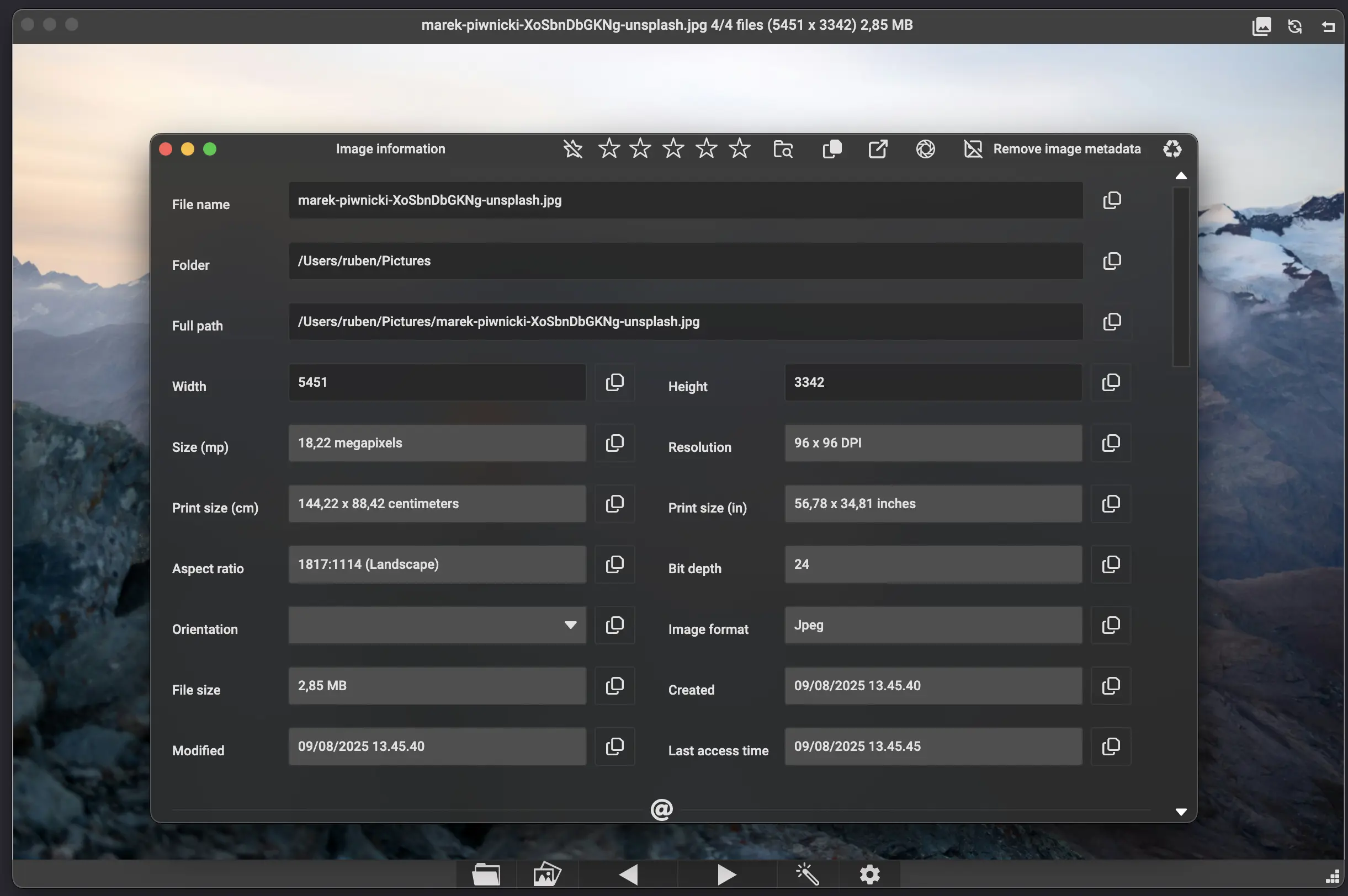
🖼️ Image Info Window
-
Resizable layout The
Image Infowindow is now resizable and adjusts the layout of text and icons dynamically to utilize the available space. -
Editable Exif data
- You can now edit text-based Exif fields like
Author,Copyright,Subject,Title,Comment, etc. - Date and time pickers for
Date Taken,Created,Modified, andLast Accesstext boxes are planned for the next major release.
- You can now edit text-based Exif fields like
-
Improved UI feedback
- A loading indicator is now shown during renaming, resizing, and saving operations.
- The
Exif ratingbuttons,Remove image databutton, and Exif text fields are now disabled when Exif data is not supported for the viewed image.
🖼️ Batch Resize Window
- Persistent settings
- The
Quality,Compression, andConversionfields now persist across sessions (#204). - Resizable layout and full persistence of all values are planned for the next major release.
- The
⚙️ Settings
-
New option: Disable file history You can now choose whether PicView should remember previously opened files (#230).
-
Additional background color option A new background color has been added to the appearance tab in the
Settingswindow.
🐞 Bug Fixes
- Fixed RAW camera image loading issues (#238, #221, #234).
- Fixed certain cases where navigating to the next folder didn’t work.
- Fixed inability to copy an image while in crop mode.
- Fixed gallery thumbnail size sliders not saving changes (#237).
- Fixed an issue where horizontal flip wasn’t applied when saving an image (#229).
- Fixed incorrect image orientation for certain RAW camera files at startup.
- Fixed zoom level not updating correctly in the title bar when zooming.
- Fixed confirmation dialog settings not being saved for when deleting or moving files to the recycle bin.
- Fixed
Open last filebutton not always loading the correct file. - Fixed gallery toggle not resizing properly when UI visibility changes.
- Fixed infinite recursion when attempting to load a missing file from history.
- Fixed crash when starting a slideshow (#239).
- Fixed blank image rendering after duplicating a file.
- Fixed rotation context menu appearing when right-clicking the title bar to rename.
- Fixed image rotation not filling the window correctly at 90° or 270° angles.
- Fixed first/last image navigation buttons not working correctly.
- Fixed PicView not recalling directory structure when navigating between folders.
- Fixed gallery thumbnails being added when new images appear in the viewed directory while the gallery is initially disabled.
- Fixed the
Clear effectsbutton in theImage effectswindow not properly displaying theCancelbutton afterward. - Fixed
Copy base64context menu options, for an individual gallery item not working.
🪟 Windows Updates
- Window scaling/DPI Added DPI awareness manifest file for improved high-DPI support on Windows. (#197)
🍏 macOS Updates
- Fixed layout issues when restoring windows from fullscreen or maximized state.
- Fixed macOS window buttons not working in fullscreen.
- Fixed crash when loading gallery thumbnails.
- Fixed issues where the tool windows wouldn’t become active after reopening.
- Fixed startup position not centering correctly when Auto-fit window is enabled.
- Fixed GIFs not being properly recognized on macOS.
- Fixed macOS native menu items such as
Image optimization,Open with,Delete file, etc., not being disabled when no valid file or image is available. - Fixed window not showing when opening a new file on macOS, when window is minimized.
Known macOS bugs:
- The option to open files in a new window, requires a restart to take effect.
- The native menu does not persist when switching from the main window to a tool window
🗺️ Translations
- Updated Korean by @VenusGirl in https://github.com/Ruben2776/PicView/pull/233
- Updated Turkish in https://github.com/Ruben2776/PicView/pull/231
📝 Miscellaneous
- Added hotkey bindings for file sorting options in the
Keybindingswindow. - The option to toggle whether the background color fills the entire window or just behind the image now defaults to filling the entire window.
- Updated ZLinq and ZLinq.FileSystem to version 1.5.2.
- Updated Avalonia to version 11.3.3.

