
 Download
ATTENTION: This project is not maintained anymore. Current Macs properly manage temperature and fans.
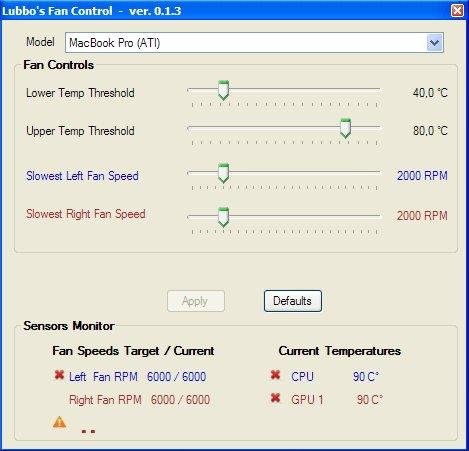
Speed fan controller and temp monitoring for MacBook Pro Unibody (Nvidia) for Windows under BootCamp. It allows to control MacBook fans speeds depending on the CPU and GPU temperature.
ATTENTION: This program is designed and tested only on MacBook Pro with NVIDIA GPU.
On newer MacBooks with ATI GPU the GPU temperature is not checked.
On iMacs some sensors and fans are not used.
In any case USE AT YOUR OWN RISK, I'm not responsible for overheating or hardware damage.
Features
- Min and Max Fans Speed
- 2 Fan control: Right (GPU) and Left (CPU) depending on CPU/GPU temperature
- Main support: MacBook Pro Unibody. Other models: MacBook Pro, MacBook Air,
- Monitoring: Fans Speed, Temperatures (CPU, GPU integrated, GPU NVidia)
- Compatible with other SMC monitoring tools (version => 1.0.0)
- REQUIRES: Microsoft Visual C++ 2010 Redistributable Package
- ATTENTION: NO WARRANTY - Use at your own risk
Project Samples



License
GNU General Public License version 2.0 (GPLv2)Follow Lubbo's MacBook Pro Fan Control
Other Useful Business Software
Enterprise-grade ITSM, for every business
Freshservice is an intuitive, AI-powered platform that helps IT, operations, and business teams deliver exceptional service without the usual complexity. Automate repetitive tasks, resolve issues faster, and provide seamless support across the organization. From managing incidents and assets to driving smarter decisions, Freshservice makes it easy to stay efficient and scale with confidence.
Rate This Project
Login To Rate This Project
User Reviews
-
The app is buggy and outdated. Moreover it doesn't have UI. Do yourself a favor and use free "Macs Fan Control" app (google for it), it supports all apple hardware on Windows and also Mac.
-
Great program! does exactly what it says. The only caveat for me is that it won't read my cpu temp, which is weird because smcfancontrol does it when im on osx. I'm on a late 2013 rMBP on mavericks.
-
Works great on MacBook Retina 2012
-
Great program to Bootcamp, because Windows does not correctly manage the fans. "jvilavong": To start minimized automatically, just put a shortcut in startup folder (C: \ ProgramData \ Microsoft \ Windows \ Start Menu \ Programs \ StartUp) and the properties of the shortcut in "execute" choose "Minimized"
-
Works on my Mac Mini (late 2012). Installed it just to check and IMMEDIATELY heard the fan kick in. My first response was honestly "thank God." Bootcamp Windows 7 was running a bit hot and I missed the options with iStatMenu. Good work on this folks!

