XSIBackup-App Blog
Backup and replicate Linux files, databases and ©VMWare ©ESXi VMs
Brought to you by:
danjgf

©XSIBackup-App is the evolution of ©XSIBackup-DC concept as a service running in the very ©ESXi hypervisor to extend its functionalities to control multiple servers from one single point of management.
With this growth in its possibilities come new challenges though. When ©XSIBackup was executed as a local service, its algorithms didn't have to worry much about latency, as it would read data from local disks or nearby NFS volumes in a LAN.
Latency was a constraint in regards to targets over IP though, should they be far away in networking terms, namely: high latency. This would represent an issue, as the TCP protocol expects an acknowledgement from every packet sent and the accumulated delay affects effective throughput as latency grows.
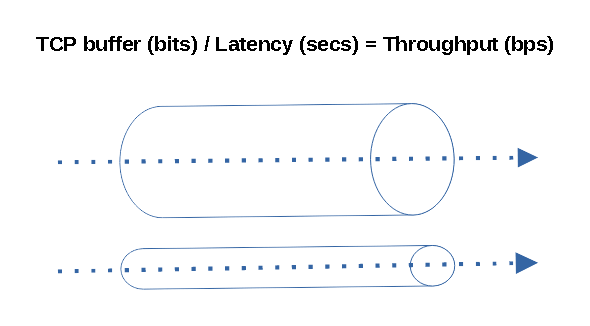
©VMWare ©ESXi SSH SCP Throughput limitations
This won't be a problem if you keep latency low. When you work in a LAN with contained latency throughput figures remain fairly decent between 50 to 100 MB/s in commodity hardware with GB NICs. Nonetheless if you try to use the software over a WAN or the Internet you will notice effective throughput falls down. This is normal, you will experience the same with any data transfer software such as Rsync, WinSCP or any other similar TCP sofware and is due to the very nature of TCP.
We did kinda solve part of the problem by using threads since ©XSIBackup 1.6. The main optimization consists in using a thread to read data, a different thread to write it down and to do it all at the same time. This divides the problem in a half and optimizes LAN data transfer to the Gigabit network hardware limits. When combined with new CPUs you can even saturate a 2.5 Gigabit link.
Still, if you try to perform big data transfers across distant places, the narrowing of the effective throughput will still be an issue. 99% of the people won't even try to move terabytes of data across continents, still there are a few cases in which this is necessary.

Narrowband data transfer + high latency offsite backups
The USA, the EU and southeast Asia are somewhat well connected, but there are still many places in the world where things don't work the way we are used to in well connected areas. I had hit this reality before when working with VoIP in South America: Chile and Peru, as latency becomes a problem to make a telephone conversation feasible, but VoIP works over UDP, there is no acknowledgement. When you add the necessity to use TCP, like when transferring big amounts of data like huge virtual disks, you realize you can't use regular sysadmin tools the way you are used to.
Going backup to ©XSIBackup-App. The appliance now offers the possibility to connect to arbitrarily distant sources and targets, both servers to be backed up and backup servers can be a far away link. That multiplies its possibilities but also opens the door to new ways of misusing the tool.
Let's say you are somewhere in western Europe. If you connect over SSH to an ©ESXi host in the USA and want to store the resulting backups in Singapore, you are going to go through an excruciating wait. Provided that both links are stable and that you have some 300ms of latency on each side you will be lucky if you achieve 1 MB/s.
If you really needed to do such thing, you would need to devise some method approximating the concept in the post above, otherwise prepare to bang your head against the wall. Placing the ©XSIBackup-App appliance in the source ©ESXi server would be the wisest thing. Then you would need to find out whether you can transfer the data directly to the host in Singapore, or you need to store it in some closer to the USA server to then sync the data to its final target server.
There are ways to overcome this inherent TCP/IP limitation. One would be to use UDP and then use some checksumming strategy to verify the data, but that would be reinventing TCP. Another approach would be to use multiple independent TCP streams to increase the effective throughput by multiplexing the data transfer. You could also get some Starlink satellite link, which would for sure lower the latency by 3 to 5 times (not publicity, but an objective solution).
We will address the transfer of data over high latency links in the next months, by now use this tool in controlled scenarios: LAN, and links with latencies below 40 ms, otherwise you are going to hit some serious trouble getting your data through to its destination.


