
Menu
▾
▴
Posted by
 2018-02-12
Labels:
3d modeling
pottery
3d printing
3d graphics
visualization
virtual reality
universe of things
ceramics
2018-02-12
Labels:
3d modeling
pottery
3d printing
3d graphics
visualization
virtual reality
universe of things
ceramics
Posted by
2018-02-11
Labels:
3d modeling
3d printing
3d graphics
pottery
visualization
Posted by
2018-01-05
Labels:
pottery
3d modeling
3d graphics
3d printing
ceramics
math
visualization
3d effects
texture mapping
Posted by
2017-11-28
Labels:
PotterDraw
texture mapping
mesh synthesis
math
visualization
3d graphics
3d printing
3d modeling
pottery
ceramics
Posted by
2017-09-06
Labels:
pottery
ceramics
3d printing
3d graphics
3d modeling
math
visualization
trigonometry
Posted by
2017-09-06
Labels:
3d graphics
3d printing
CAD
pottery
ceramics
Posted by
2017-08-25
Labels:
3d printing
3d graphics
pottery
lampshades
Posted by
2017-08-24
Labels:
3d printing
3d graphics
pottery
3d design
ceramics
Posted by
2017-08-16
Labels:
3d printing
3d graphics
animation
pottery
ceramics
Posted by
2017-08-15
Labels:
3d printing
3d graphics
3d design
pottery
ceramics
Posted by
2017-08-13
PotterDraw / Blog: Recent posts
The evolution of PotterDraw: a math holiday
While on vacation in Playa del Carmen I encountered something unexpected nestled between the palm trees: a paint-your-own pottery shack. It was a small thatched hut containing several plain wooden tables and benches, with molded pottery painted in traditional styles hanging on the walls. Unpainted pieces were available on shelves in a wide variety of shapes, already fired and coated with a white gesso-like base. The tables were crowded with a profusion of small jars of acrylic paint in many colors, along with tin cans containing brushes. You picked out a piece, received a dish of water and a paper towel, and painted, taking as long as you liked. When you finished, the staff stored your piece, so it could be clear-coated overnight. ... read more
2018-02-12
Labels:
3d modeling
pottery
3d printing
3d graphics
visualization
virtual reality
universe of things
ceramics
PotterDraw 1.0.6 adds Ruffle, a new mesh effect with great creative potential
Version 1.0.6 features a new mesh effect called Ruffle. Ruffles are essentially wavy ripples. Imagine a corrugated drain pipe, standing on end. The corrugations are ripples. Now picture a periodic wave applied to the ripples, as they progress around the circumference of the pipe. The result is ruffles, so named because they resemble the ruffled collar that was the height of men's fashion during the Elizabethan period. The Ruffle effect opens up many new creative possibilities, some of which are shown below.... read more
2018-02-11
Labels:
3d modeling
3d printing
3d graphics
pottery
visualization
PotterDraw 1.0.5 features new mesh effects, new texture mappings, transparency
PotterDraw 1.0.5 introduces many new features including 1) exponential properties for the Ripple and Bend mesh effects, 2) new texture mapping algorithms that take the surface normals as input, and 3) transparency. The images below demonstrate some of these features.
For Ripple and Bend, Operation, Power, and Power Type properties were added. Setting Operation to Exponentiate causes ripples or bends to be proportional, such that their depth scales with radius, which wasn't possible before. Power and Power Type allow the underlying ripple or bend waveform (a sine wave) to be distorted into various types of exponential curves.... read more
2018-01-05
Labels:
pottery
3d modeling
3d graphics
3d printing
ceramics
math
visualization
3d effects
texture mapping
PotterDraw 1.0.4 adds polygon properties, radius color mapping, and more
Version 1.0.4 of PotterDraw adds several major new features. Most of important of these is the Polygon effect, a new group of mesh properties that facilitate the creation of polygonal pots. The polygon can have any number of sides greater than two, and since fractional values are supported, the number of sides can be smoothly modulated. The Roundness property lets you round the polygon’s corners, while the Bulge property lets you bulge or pinch the polygon’s sides. In previous versions, roughly polygonal pots could be made by tweaking the Scallop properties, but the new polygon properties are much more flexible and precise, and can be combined with the Scallop properties to make scalloped polygonal pots, which was previously impossible.... read more
2017-11-28
Labels:
PotterDraw
texture mapping
mesh synthesis
math
visualization
3d graphics
3d printing
3d modeling
pottery
ceramics
PotterDraw 1.0.3 adds more scallop options and new waveforms
PotterDraw 1.0.3 adds some new features that allow more radical pottery designs. The biggest change is the addition of several new scallop-related properties, including Scallop Waveform, Operation, Range, and Power. In previous versions, the scallops were always sine waves, but now there are many waveforms to choose from. The curvature of the scallops can also be changed, using the Scallop Power property, and whereas previously scallops could only be added to the pot's radius, now subtraction, multiplication, division, and exponentiation are also possible. All of the new scallop properties can be also modulated, opening up many new avenues for creativity.... read more
2017-09-06
Labels:
pottery
ceramics
3d printing
3d graphics
3d modeling
math
visualization
trigonometry
New version of PotterDraw adds Scallop Phase and other useful features
A new version of PotterDraw (1.0.2) is now available. It adds a new property called Scallop Phase, which is useful for making wavy scallops, as shown in the images below. This property was added at the suggestion of user Juan Bustos at Filar3D. Other new features in this version include a Load Texture command added to the File menu, the ability to load a texture file via drag and drop from Explorer, automatic checking for updates, better-optimized texture mapping for improved animation frame rates, and an option to continuously update the 3D view during spline dragging. Download the new version here.... read more
2017-09-06
Labels:
3d graphics
3d printing
CAD
pottery
ceramics
Filar3D finds unexpected use for PotterDraw
Buenos Aires-based Filar3D is using PotterDraw to design... wait for it... lampshades! According to Filar3D's Juan Jose Bustos, "It makes my work super fast ... I have to take several steps to accomplish the same results with other software." Thanks to Juan for using PotterDraw in an unanticipated way, and for his suggestions, which will be addressed in subsequent releases of PotterDraw.
Filar3D's Facebook page is here and their 3D printed lampshades will soon be available at their online shop... read more
2017-08-25
Labels:
3d printing
3d graphics
pottery
lampshades
Interview with Chris Korda: 3D printing pottery, open-source software and activism
PotterDraw received another good review today, this one from global media company 3D Printing Industry (3DPI). The review highlighted PotterDraw's ease-of-use, pointing out that "Typically, would-be-designers would have to digitally sculpt such designs or build them from the ground-up using polygons/stock shapes. By comparison, Korda’s software automatically generates vessel interiors."... read more
2017-08-24
Labels:
3d printing
3d graphics
pottery
3d design
ceramics
PotterDraw reviewed in All3DP: "Great Specialist for 3D Printing and 3D Designing Cylindrical Shapes"
PotterDraw received an excellent review today from the Munich-based 3D printing news organization All3DP. Under the heading "PotterDraw: Great Specialist for 3D Printing and 3D Designing Cylindrical Shapes", the review states that "PotterDraw really is a great case of 3D specialist software – it gets the job done with ease, and even if you have never designed before, you can use the software. It also includes a concise and helpful documentation." The revew includes images and video demonstrating PotterDraw's capabilities.... read more
2017-08-16
Labels:
3d printing
3d graphics
animation
pottery
ceramics
PotterDraw featured on 3ders.org
The 3D printer and 3D printing news organization 3ders.org published an excellent review of PotterDraw today, complete with pictures and video.
PotterDraw is a free software application that lets users design pottery for full-color 3D printing. The pot's outer wall is drawn using a spline editor, while the inner wall is generated automatically. The pot’s texture can be synthesized or loaded from an image file. Various trigonometric effects can be applied to the mesh and the texture, and the effects can be modulated with low-frequency oscillators to create animated videos.... read more
2017-08-15
Labels:
3d printing
3d graphics
3d design
pottery
ceramics
PotterDraw: Design your own pottery for 3D printing in full color
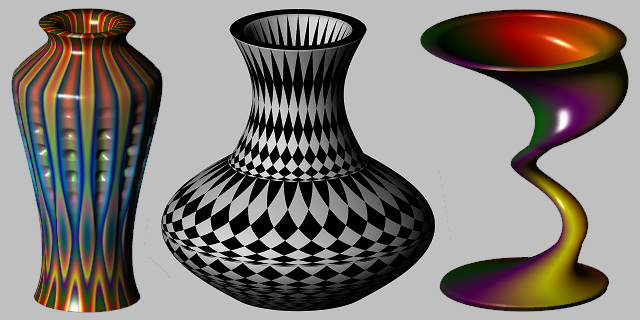
PotterDraw is a 3D software application for designing and visualizing pottery. You draw the pot's outer wall using a spline, while the inner wall is generated automatically. You can map synthesized textures or image files onto the pot, export files for 3D printing, modulate mesh and texture properties with oscillators, and animate your modulations to create videos.... read more
2017-08-13
