I've got a preliminary new version of LAC, optimized for the Valve Steam Deck, almost finished. I expect to release it for beta testing early next week. It solves all of the little problems I discovered and described in the previous postings on this forum. You can read more details at the bottom of our online ChangeLog according to the usual pattern. Find it here:
Linux Air Combat Version "Lac08p89SD" is now working nicely on my Steam Deck! I will be releasing this version for early Beta Testing within 48 hours. All important functions and features are working, and it is DEFINITELY possible to be competitive online with this setup.
LAC now has a mechanism for overcoming the limited number of control buttons. I call this the "Tap Menu", and it is available by repeatedly tapping on the joystick button configured for "Target Vocalize". The first time that button is tapped, the player sees "...VOCALIZE..." on the cockpit's scrolling, 3-line System Message Panel. If the player doesn't tap that button again, the message is displayed for 3 seconds and then the "Target Vocalize" command is activated.
On the other hand, if the player taps that button again within the 3-second time window, the "...VOCALIZE..." message is replaced with "...IFF..." for 3 seconds and, following the same pattern, the "Toggle IFF" command is activated unless the player taps that button again beforehand.
There are ten of these "Tap Menu" commands, giving access to all of the following LAC functions through that one joystick button:
1 Tap: Target Vocalize
2 Taps: Toggle IFF
3 Taps: Switch Mumble to TeamCast Channel
4 Taps: Switch Mumble to MissionCast Channel
5 Taps: Send "YES" on Morse Code Radio
6 Taps: Send "NO" on Morse Code Radio
7 Taps: Send "NO KEYBOARD" on Morse Code Radio
8 Taps: Send "ONLY YES/NO" on Morse Code Radio
9 Taps: ESCAPE to LAC's menus
10 Taps: Reset Tap Count and start over
That mechanism works well enough for effective online play without access to a keyboard, but for reasons explained below, the two italicized items do not work yet.
However, there are still a few things needing improvement. Expect to see more Steam Deck releases in the next few weeks to address these. Here are the things that need attention:
1- Acoustic volume of the engines is excessive and causes a bit of distortion thru the speakers at full throttle.
2- I need to expand the Tap Menu to allow access to "Map Mode" (and perhaps a few other things like "Team Cycle" and "Realm Cycle". See below.)
3- Although "Mumble" is available as a "FlatPack" on the Steam Deck and works reasonably well in its voice-activated mode without access to a keyboard, LAC's current Mumble management logic cannot penetrate the FlatPack wrapper, so Mumble channel-changes are not automated and the user is forced to select the appropriate Mumble channel before starting LAC. I will be looking for a better way to handle this.
4- Although "firefox" is also available as a "FlatPack" on the Steam Deck and works reasonbly well for accessing LAC documentation, LAC's current "Preferred Browser" management logic cannot penetrate the FlatPack wrapper, so LAC cannot automatically bring up web pages from within its menus. Users must exit LAC to consult online documentation through firefox.
5- There is some kind of timing-related bug at mission startup that causes LAC to "hang" from time to time. On most hardware this is rare, but on the Steam Deck it happens about 75% of the time. Since the only way to launch LAC on the Steam Deck at present requires issuing the "./lac" command from the keyboard, this bug is particularly cumbersome in that enviroment because users are forced to use the Steam Deck's awkward keyboard even more than they would otherwise expect. On average LAC must be re-started three or four times before any mission is commenced without problems. (The good news is that once missions get properly started they run splendidly thereafter to completion.)
6- There are some minor differences in the way Linux on the Steam Deck advertises mouse clicks to applications like LAC. As a consequence, LAC cannot detect mouse clicks within the "Realm Cycle" or "Team Cycle" areas of the mission menus. Users must use a text editor to edit the LacConfig.txt file to change teams or Realms. Perhaps I will move those functions into the Tap Menu for easier access.
I will continue to update this thread as I learn more.
; )
Last edit: bbosen 2022-10-24
If you would like to refer to this comment somewhere else in this project, copy and paste the following link:
All of the problems listed above are solved with versions 8.95SD and later for the Valve Steam Deck. Download the latest version from our production archives here:




I've got a preliminary new version of LAC, optimized for the Valve Steam Deck, almost finished. I expect to release it for beta testing early next week. It solves all of the little problems I discovered and described in the previous postings on this forum. You can read more details at the bottom of our online ChangeLog according to the usual pattern. Find it here:
https://askmisterwizard.com/2019/LinuxAirCombat/LinuxAirCombatChangeLog.htm
Linux Air Combat Version "Lac08p89SD" is now working nicely on my Steam Deck! I will be releasing this version for early Beta Testing within 48 hours. All important functions and features are working, and it is DEFINITELY possible to be competitive online with this setup.
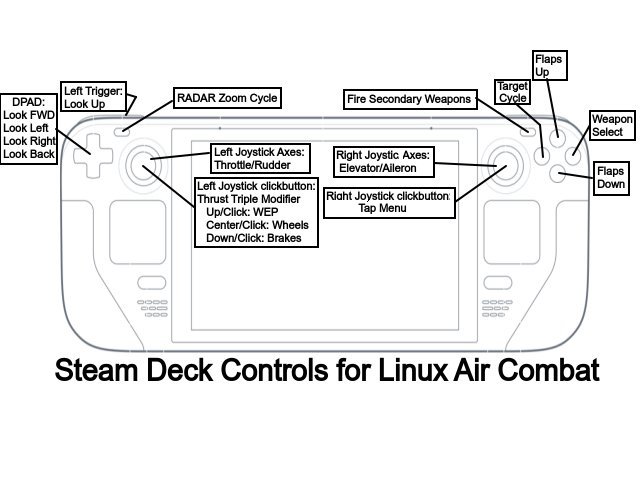
LAC now has a mechanism for overcoming the limited number of control buttons. I call this the "Tap Menu", and it is available by repeatedly tapping on the joystick button configured for "Target Vocalize". The first time that button is tapped, the player sees "...VOCALIZE..." on the cockpit's scrolling, 3-line System Message Panel. If the player doesn't tap that button again, the message is displayed for 3 seconds and then the "Target Vocalize" command is activated.
On the other hand, if the player taps that button again within the 3-second time window, the "...VOCALIZE..." message is replaced with "...IFF..." for 3 seconds and, following the same pattern, the "Toggle IFF" command is activated unless the player taps that button again beforehand.
There are ten of these "Tap Menu" commands, giving access to all of the following LAC functions through that one joystick button:
1 Tap: Target Vocalize
2 Taps: Toggle IFF
3 Taps: Switch Mumble to TeamCast Channel
4 Taps: Switch Mumble to MissionCast Channel
5 Taps: Send "YES" on Morse Code Radio
6 Taps: Send "NO" on Morse Code Radio
7 Taps: Send "NO KEYBOARD" on Morse Code Radio
8 Taps: Send "ONLY YES/NO" on Morse Code Radio
9 Taps: ESCAPE to LAC's menus
10 Taps: Reset Tap Count and start over
That mechanism works well enough for effective online play without access to a keyboard, but for reasons explained below, the two italicized items do not work yet.
However, there are still a few things needing improvement. Expect to see more Steam Deck releases in the next few weeks to address these. Here are the things that need attention:
1- Acoustic volume of the engines is excessive and causes a bit of distortion thru the speakers at full throttle.
2- I need to expand the Tap Menu to allow access to "Map Mode" (and perhaps a few other things like "Team Cycle" and "Realm Cycle". See below.)
3- Although "Mumble" is available as a "FlatPack" on the Steam Deck and works reasonably well in its voice-activated mode without access to a keyboard, LAC's current Mumble management logic cannot penetrate the FlatPack wrapper, so Mumble channel-changes are not automated and the user is forced to select the appropriate Mumble channel before starting LAC. I will be looking for a better way to handle this.
4- Although "firefox" is also available as a "FlatPack" on the Steam Deck and works reasonbly well for accessing LAC documentation, LAC's current "Preferred Browser" management logic cannot penetrate the FlatPack wrapper, so LAC cannot automatically bring up web pages from within its menus. Users must exit LAC to consult online documentation through firefox.
5- There is some kind of timing-related bug at mission startup that causes LAC to "hang" from time to time. On most hardware this is rare, but on the Steam Deck it happens about 75% of the time. Since the only way to launch LAC on the Steam Deck at present requires issuing the "./lac" command from the keyboard, this bug is particularly cumbersome in that enviroment because users are forced to use the Steam Deck's awkward keyboard even more than they would otherwise expect. On average LAC must be re-started three or four times before any mission is commenced without problems. (The good news is that once missions get properly started they run splendidly thereafter to completion.)
6- There are some minor differences in the way Linux on the Steam Deck advertises mouse clicks to applications like LAC. As a consequence, LAC cannot detect mouse clicks within the "Realm Cycle" or "Team Cycle" areas of the mission menus. Users must use a text editor to edit the LacConfig.txt file to change teams or Realms. Perhaps I will move those functions into the Tap Menu for easier access.
I will continue to update this thread as I learn more.
; )
Last edit: bbosen 2022-10-24
All of the problems listed above are solved with versions 8.95SD and later for the Valve Steam Deck. Download the latest version from our production archives here:
https://sourceforge.net/projects/linuxaircombat/files/Choose%20Your%20Platform/Steam%20Deck/